 Orbit
Orbit
An AI assistant that lives on your computer.
Orbit works with your email, files, calendar, notes and tasks — using Claude, GPT, or private models that never leave your machine. It asks before it sends or changes anything.
Ask what you're looking at. Orbit shows you.
Press Ctrl Shift Space and ask “can you explain this to me?” Orbit takes a picture of the window you're in and walks you through it point by point — circling the number that matters, boxing the line that broke, underlining what to fill in — with a short note beside each. The first drawing appears in about two seconds. Ask a follow-up right there, or have it read aloud. And for “translate this” or “reply to that”, Orbit reads the window you're in and answers — no copying and pasting.
Consumer prices climbed 4.8% this year, mostly from energy and rent.
Can't decide? Let Orbit narrow it down.
Say you don't know what to cook, watch or buy. Orbit shows two options — you click the one you like better, and it puts your pick up against something new. Each round it learns a little more about your taste, then suggests the winner and a few things like it.
Private AI, one click away.
Browse 36 models that run entirely on your computer — grouped by what they're good at. Orbit checks your memory and graphics card and tells you which ones will run well before you install anything.
It can use your computer, too.
- Plan. You say “Note down milk, eggs and bread”. Orbit makes a short plan.
- See. It reads the screen and numbers every button and field it finds.
- Act. It moves the mouse and types — move yours to pause it any time.
- Check. It looks again to make sure the job is really done.
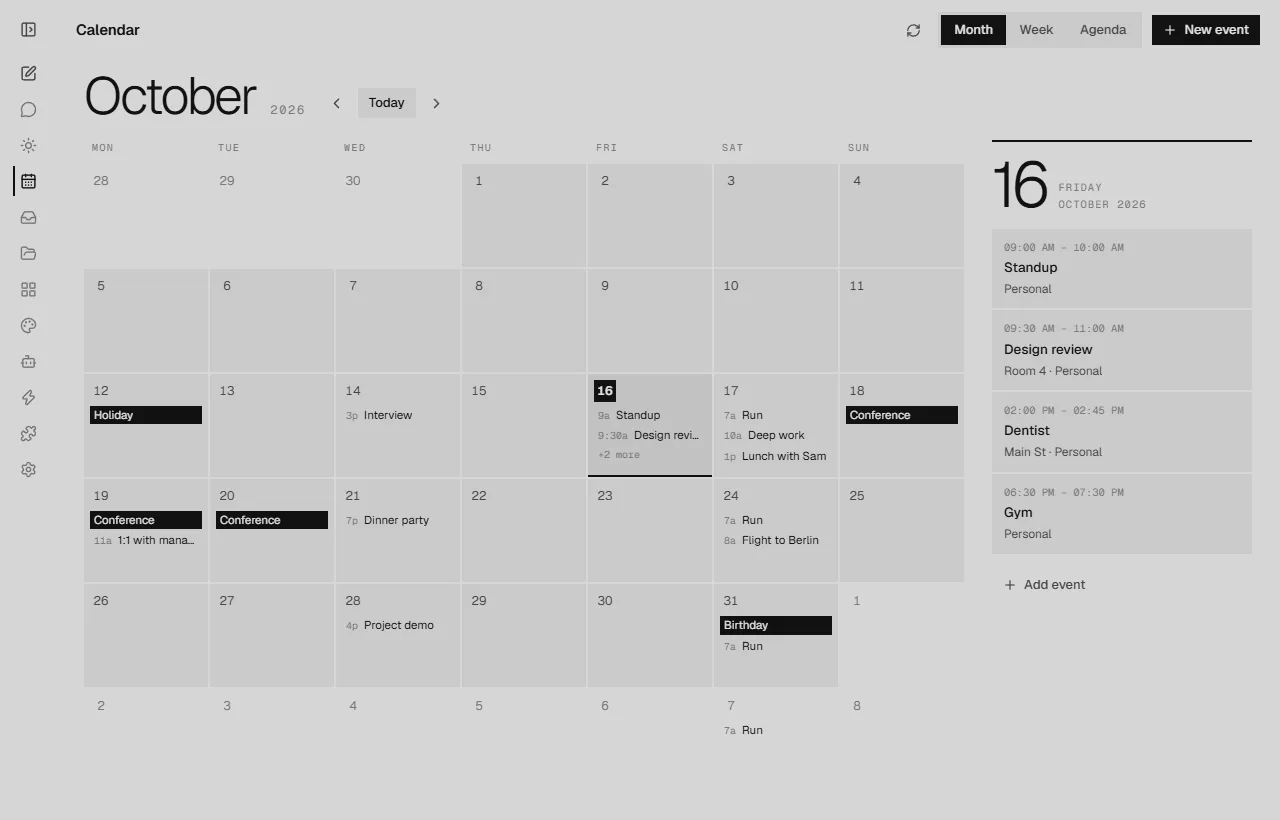
Calendar, tasks and inbox in one place.
See what's due, what's coming up and which emails need a reply. Ask for a day brief and Orbit suggests your priorities and an order for the day. Connect Notion or any iCal calendar.
Orbit for the whole office.
One computer hosts, everyone else joins. Every project becomes a channel where people talk, share files and keep tasks — and anyone can write @Orbit to bring it in. It knows the project's files, tasks and notes, and who in the office handles what.
Everything stays on the office's own computer. Pick a local model and not a word leaves the building.
The Harbour Hall has 14 March free.
🎉 2@ana can you confirm the budget before we book?
@Orbit what's the venue budget, and what's still open?
The venue budget is CHF 4,000 (it's in Launch budget.xlsx). Still open:
- Book the venue — Bob, by 28 Oct
- Confirm the photographer — Carla, Friday
And everything else you'd want
- Email
Triage, search and summarize Gmail, Outlook, iCloud or any IMAP inbox. Replies wait for your OK.
- Files & documents
Finds a document by its name or by what it says, and reads PDFs, Word, Excel and PowerPoint — only in folders you choose to share.
- Quick bar
Press Ctrl Shift Space anywhere for a floating mini chat — or to have Orbit explain your screen. ⌘ Shift Space on a Mac.
- Agents
Build specialists with their own instructions, tools and model — a writer, a coder, a planner.
- Automations
Reusable tasks with a form — cover letters, follow-ups, weekly reviews — on demand or on a schedule.
- Loops
Give Orbit a goal and it keeps working in rounds until it's done, telling you when it finishes.
- Skills
Teach Orbit new skills in the same format Claude uses, or install ones the community made.
- Creative Studio
Twelve apps for photos, vectors, video, slides and more — with Orbit beside each one, making the changes you ask for.
- A natural voice
Orbit reads replies and explanations aloud in a natural voice made right on your computer. Nothing you hear is sent anywhere.
- Learns as you go
After a chat, Orbit keeps what helps next time — how you like answers, what you corrected — and offers to automate what you ask often.
- Keeps itself current
New versions arrive by themselves — one click to install. And if you ever want it gone, it uninstalls cleanly from Settings.
- Asks first
Sending an email or moving a file always shows you the full draft before anything happens.
Your data stays yours.
Stored on your computer. Chats, notes, tasks and settings live in a folder on your machine — not on a server.
Fully offline if you want. Pick a local model in the Cookbook and nothing you ask ever leaves your computer.
Your keys, your accounts. Use your own Claude or OpenAI key, or none at all. Delete them any time.
No account needed. Orbit runs on your computer — there's nothing to sign up for and no Orbit server in between.
Coming soon.
Orbit is in its final stretch. When it's ready it'll be here for Windows and macOS — and once it's on your computer, it keeps itself up to date.